Skip to content

DentAI

by OpOne

The clinic’s whole day.
On one screen.

An AI-assisted dental clinic desktop that works together with the clinic software you use. Appointment confirmation, patient messages, treatment plan, installments and end of day on the shared screen of reception, the dentist and the clinic owner.

A dental clinic’s day

Sample Clinic · sample data

08:30 · Morning. Tomorrow’s appointments are read, the ones to call are listed.

09:15 · Chair. When the patient sits down, the card is on the dentist’s screen.

11:00 · Treatment plan. Items and price on one page, PDF ready.

11:20 · Installments. Due dates land on the calendar; nobody has to keep them in their head.

19:30 · End of day. A missing record is caught, the send-off is completed.

The scene describes the day of a sample clinic; the people, appointments and amounts are samples and contain no real patient data.

DentAI aims to reduce the operational load on dental clinic teams while raising the rate at which patients show up for appointments and continue treatment. Confirmation, reminders, treatment plan and payment collection on one screen; your clinic software stays where it is.

A message arrives.
You approve.

  1. Message
  2. AI draft
  3. Human approval
  4. Task
  5. Clinic software note
Messages sample data
  • AYPatient · A. Y.The tooth I had filled yesterday aches, is that normal?
  • EAReception · E. A.Demir tomorrow 09:30 is not confirmed, I’m calling.
  • WWeb form · appointmentI would like a price and an appointment for an implant.
  • YGAssistants groupA. T.: Unit 2 set ready, Unit 4 under maintenance.set-unit2.jpg
  • MSPatient · M. S.Was my installment due this week?
  • LBLaboratory · emailPetrova’s crown try-in will make it by 11:30 tomorrow.is-emri-4471.pdf
  • KDCoordinator · M. D.Is the EN treatment plan PDF for Schmidt ready?
  • YManagement groupRequest: Kaya 10% discount · awaiting approval
  • MATechnical · M. A.The Unit 4 aspirator filter is being changed tomorrow morning.
AY Patient · A. Y.WhatsApp · yesterday 10:30 · filling · Dr. S. K.

Today 14:31

Hello, the tooth I had filled yesterday aches in the cold. Is that normal, do I need to come in?

randevu-ozeti.pdfAttachment · 62 KB
AI is preparing a reply
✦ AI draft · awaiting approval Hello, some cold sensitivity can be seen for a few days after a filling. We have passed it on to your dentist; if the ache goes beyond 3 days or gets worse, let’s book you in for a check. Get well soon. Basis: latest message + yesterday’s procedure record + the dentist’s information note

Human approval · sample re-enactment: reception pressed Approve

Hello, some cold sensitivity can be seen for a few days after a filling. We have passed it on to your dentist; if the ache goes beyond 3 days or gets worse, let’s book you in for a check. Get well soon.Sent · 14:33 · approved by: reception

Task opened: A. Y. · check-up call in 3 days · note left for Dr. S. K.

unit-3-hazir.jpgA. T. · unit 3 prepared, dentist’s note read · 14:52

Note left in the clinic software · A. Y. · “Post-filling sensitivity, informed”

WhatsApp, web form, email, laboratory, team and groups in one list. The AI prepares the reply draft; no message goes out unless you approve.

Reception

Confirmation, gaps and checks.

CONFIRMATION · WITH THE CLINIC SOFTWARE

Confirm tomorrow’s appointments today.

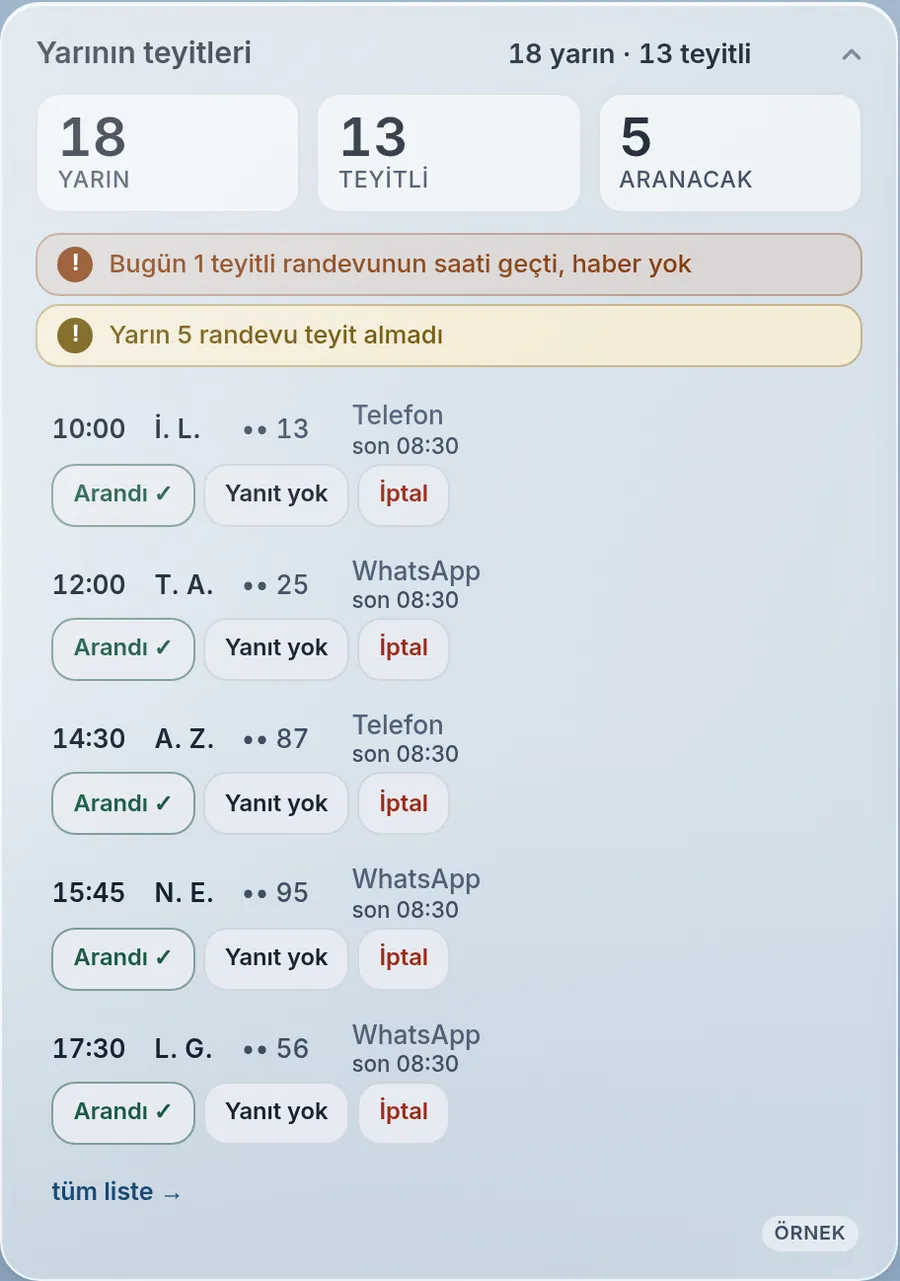
DentAI reads tomorrow’s appointments from the clinic software, separates the unconfirmed ones and writes a WhatsApp reminder draft for each. Reception approves, and the replies are entered into the list.

Sample Clinic · sample data

Tomorrow’s 18 appointments are read from the clinic software.

5 patients to call are separated, and a draft is written for each.

Reception approves; no message goes out without approval.

Replies are entered into the list, and a postponement opens a gap.

GAP · WITH THE CLINIC SOFTWARE

Fill the gap of a postponed appointment the same day.

Choose the date and the procedure. DentAI takes the dentists’ busy hours and the unit status into account; it shows uninterrupted gaps and the patients on the waiting list on the same screen.

Sample Clinic · sample data

The day, length and procedure are chosen; the calendar is read from the clinic software.

Unconfirmed and under-maintenance hours turn grey, with the reason written.

Uninterrupted available times are listed by dentist and specialty.

The AI has unconfirmed appointments called, and the times you can offer increase.

CHECKS · WITH THE CLINIC SOFTWARE

Run every appointment of the day through the checks you choose.

On every appointment DentAI compares the confirmation, unit and procedure record with the real situation in the chair. A procedure not entered into the software is reported at once, and checked again once the record is entered.

Sample Clinic · sample data

25 appointments read from the clinic software.

Confirmation, unit and procedure record are checked on every row.

10:30 Yılmaz: procedure done, no record in the software.

A notification goes to reception at once.

The correction is made in the clinic software, and DentAI checks again.

Patient

AI draft, language and treatment plan.

PATIENT · AI DRAFT

The AI gets to know the patient, prepares the message, you approve.

The AI gathers the patient’s latest procedure, the dentist’s note and the pending plan. A reply draft is prepared for every message; no message goes out unless you approve.

Sample Clinic · sample data

The patient writes at night; the message waits until morning.

The AI recognizes the patient: the last procedure, the dentist’s note and the free slot are in front of it.

The draft is written with the dentist’s note; it does not diagnose.

No message goes out without your approval.

Notes before the appointment go to the patient, and the check-up lands on the schedule.

LANGUAGE · HEALTH TOURISM

Reply to the patient in whatever language they write in.

If a patient from abroad wrote in English or Arabic, the AI prepares the draft in that language. The coordinator’s Turkish note is also translated into the patient’s language; it does not go out without your approval.

Sample Clinic · sample data

A patient from abroad writes in English, German or Arabic.

The draft is prepared in the patient’s language, with the treatment plan and transfer details.

The coordinator writes in Turkish, and the text is translated into the patient’s language.

No message goes out without your approval.

TREATMENT PLAN AND QUOTE

Send a patient who asks about price a one-page treatment plan.

The patient writes “how much are the implant and the crown?” The AI puts the items and total from the clinic price list into a one-page PDF; once the coordinator approves, it goes to the patient.

Sample Clinic · sample data

The patient asks about price, and the plan is read from the treatment plan the dentist wrote.

A PDF quote with installment options is prepared; it does not go out without your approval.

Dentist and team

One app, sterilization, records.

TEAM · ONE APP

Bring the whole team into one app, close every job with a photo.

A task lands on the assistant responsible and their team at the same time. When the job is done, a photo is added from the phone, and the proof stays in the unit history.

Sample Clinic · sample data

The task lands on the person and the team at the same time.

Tapping “Seen” turns the row yellow.

“Completed” does not open without a photo.

When it is completed, reception sees green.

It stays in the unit history with the proof photo.

STERILIZATION AND STOCK

Track the cycle, sets and biological test on the day.

Autoclave cycles, the number of sets ready and the biological test’s due time on one card. When the time passes, a task opens by itself; critical stock also warns on the same screen.

Sample Clinic · sample data

Cycle, sets and test status on one card.

When the biological test’s time passes, a task opens by itself.

The assistant starts the cycle and closes it with an indicator photo.

It is kept for audit with the time and the person on record.

TEAM · EVERY ACTION RECORDED

Keep tasks, approvals and unit movements on record.

Who took the task, when they finished it, who approved the discount: the answer is always on the screen. A break and a unit fault enter the record with one tap; patient card views leave a KVKK trail.

Sample Clinic · sample data

The assistant goes on break with a single tap on the phone.

The shift strip shows who is on break.

A unit under maintenance lands on the technical service as a task.

Who, when, which unit, which patient card: every action stays on the timeline.

PHONE AND DESKTOP

Reach it from the desktop and from the phone.

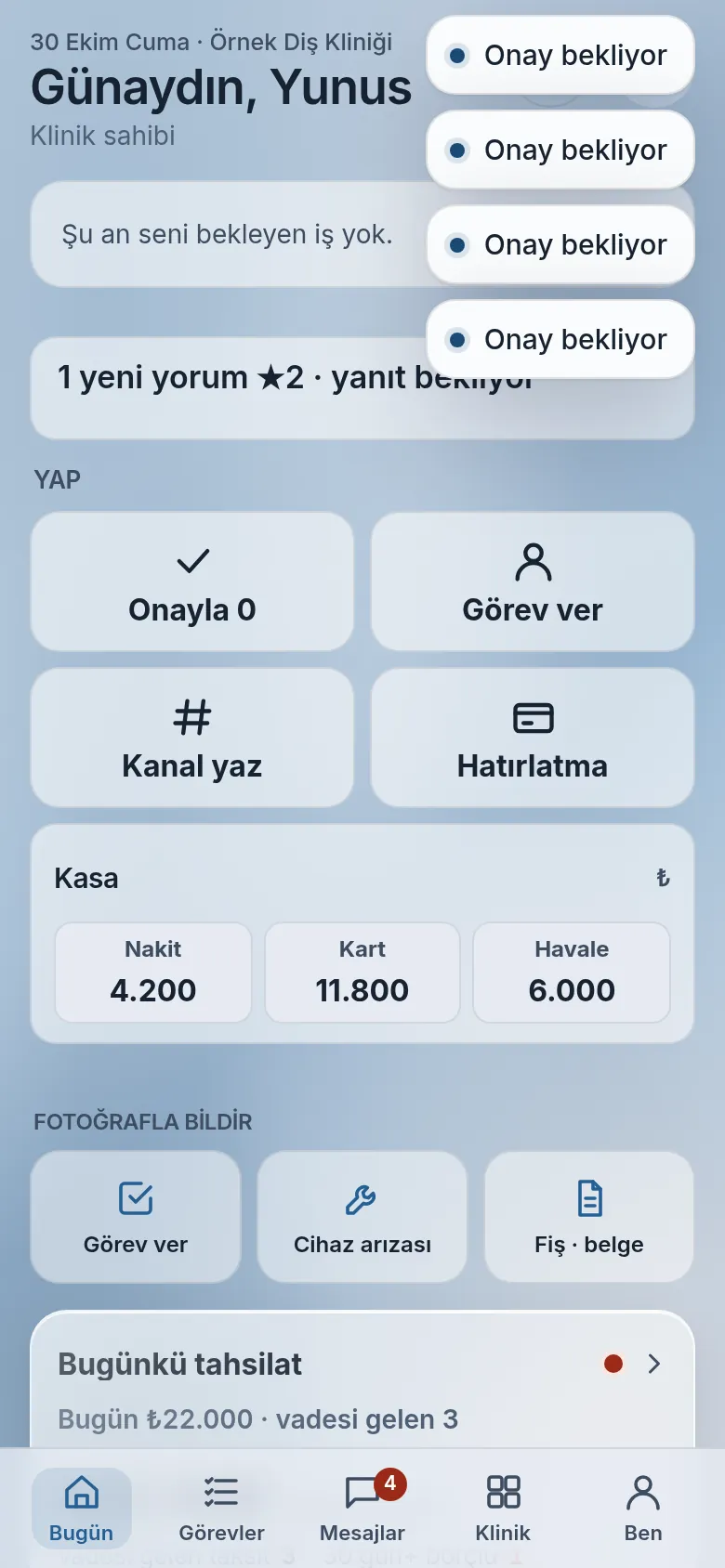
The assistant opens their task on the phone and uploads their photo; the job shows on the shared desktop screen at the same moment. The clinic owner sees pending discount and installment approvals on the phone and decides.

Sample Clinic · sample data

Approvals are listed on the desktop.

The clinic owner approves from the phone.

The assistant adds the photo from the phone, and it appears on the desktop.

When the job is done, the same row turns green on both screens.

Management

Screen layout, end of day, reports and rules.

DENTAI DESKTOP

Turn on the computer, and your clinic board is ready.

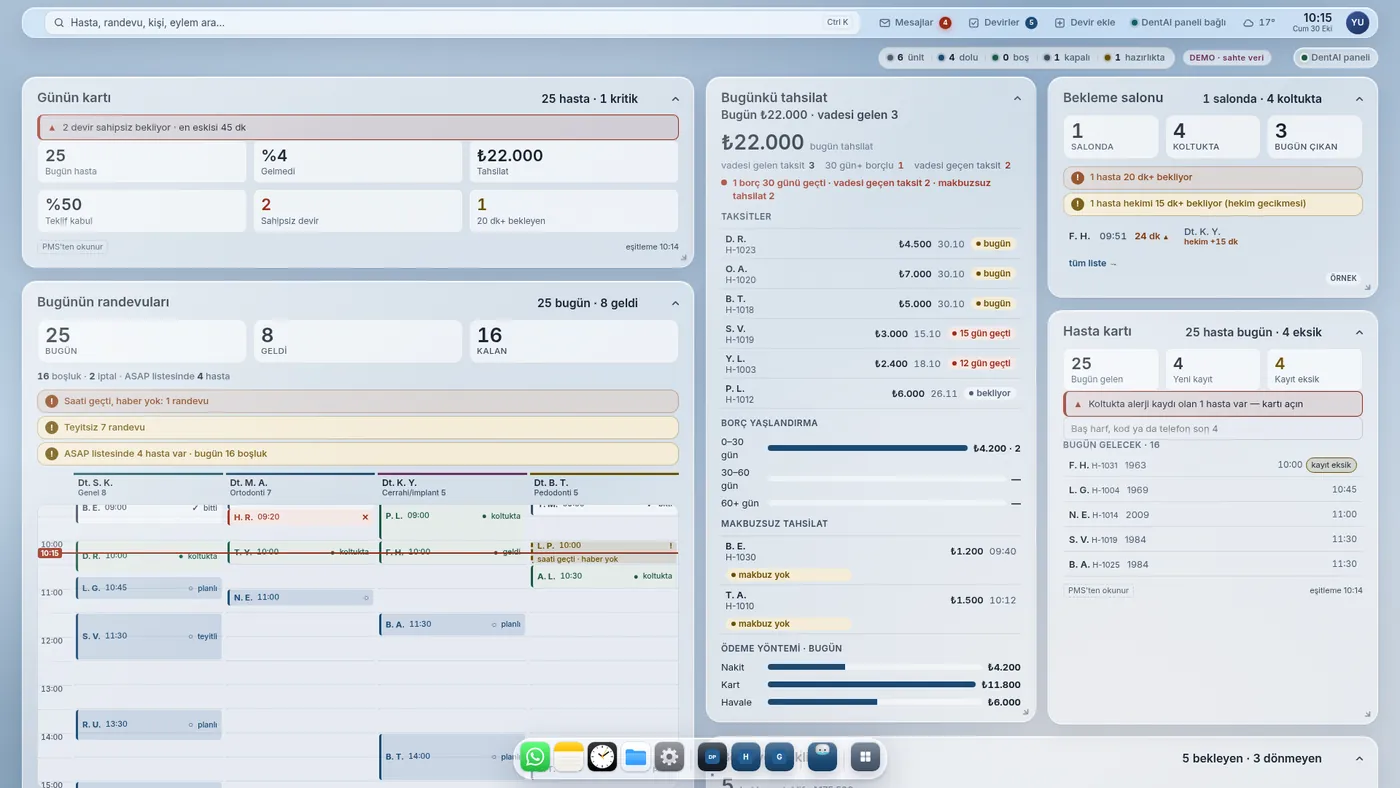
The computer starts with the DentAI desktop. You log in; the day’s card, today’s collection, the waiting room, the dentist calendar and the patient card wait ready. At the bottom is the app bar: your clinic software and the DentAI panel open with one click.

Sample Clinic · sample data

The computer starts, and DentAI greets you.You log in with your clinic’s name.

Log in, and the full clinic board is ready.The day’s card, collection, waiting room, appointments and patient card: the data is inside the boxes.

The app bar is always at the bottom.WhatsApp, notes, clock, files, the DentAI panel, patient card, Google reviews and the assistant are one click away.

WITH THE CLINIC SOFTWARE

Let your clinic software stay where it is.

DentAI does not replace your clinic software; it works beside it. It reads appointments, patient cards and treatment records from there. Reading starts read-only; a note and a task result are entered into your software only with your approval.

Sample Clinic · sample data

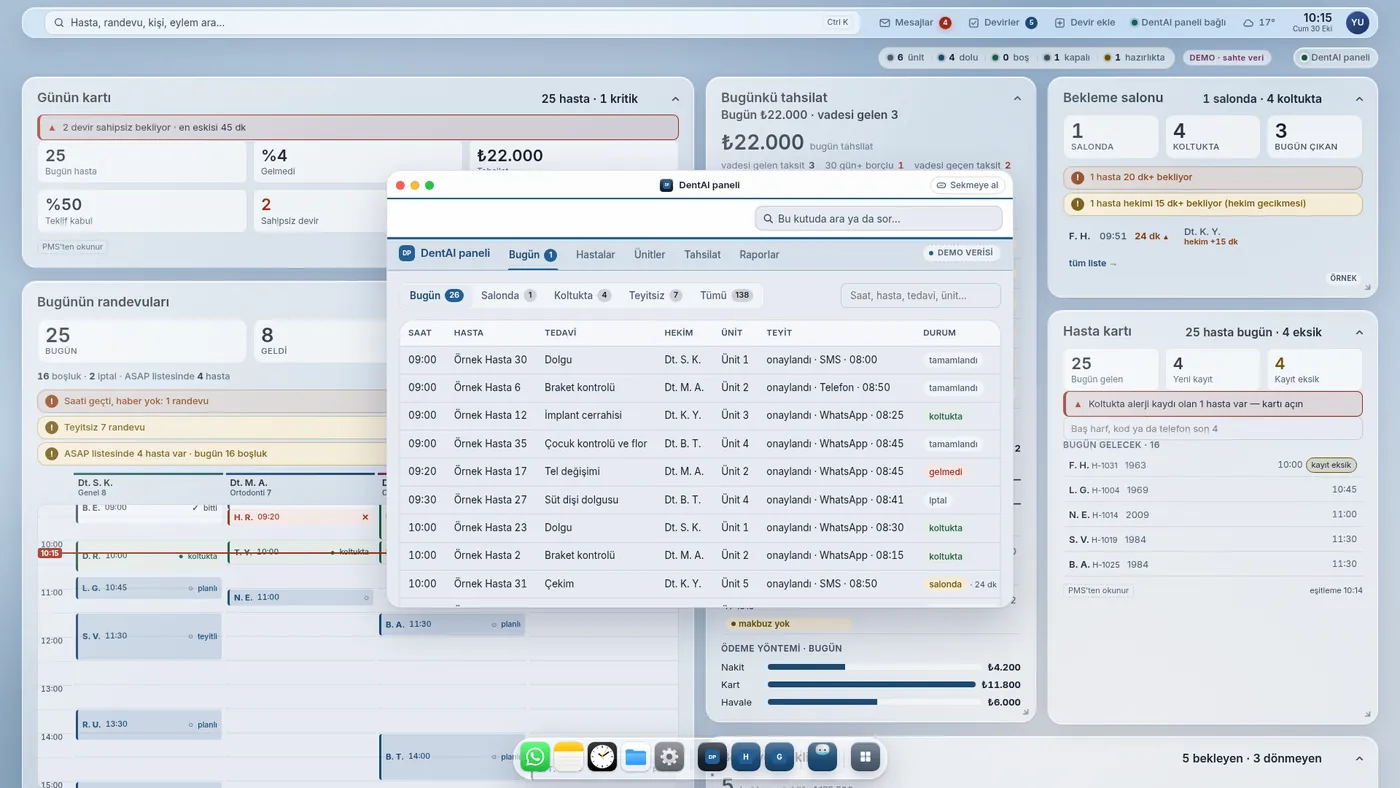
The DentAI panel opens inside the shell.Today, patients, units, collection and reports are in tabs.

Your clinic software stays open beside it.DentAI reads the appointment, patient card and treatment record from there; the software does not change.

It waits for your approval before writing.The note you approve is entered into the clinic software, and its trail stays on record.

ROLE AND PERSON

Let everyone see their own screen.

Reception, the dentist and the clinic owner each see their own screen on the same computer; revenue opens only for an authorized role. Beside every employee is an AI helper set up for their own job.

Sample Clinic · sample data

Same computer, three roles: the screen opens by role.

Reception, the dentist and the clinic owner see their own screens.

The revenue box opens only for an authorized role; it locks after 2 minutes idle.

The team picks the glass or plain theme.

Every employee has their own AI helper.

END OF DAY · WITH THE CLINIC SOFTWARE

Close the end of day without gaps.

The day’s procedures are read from the clinic software and prepared for sending. A procedure not entered into the software or missing its code is caught; the correction is made in the software, and DentAI checks again.

Sample Clinic · sample data

The day’s 25 procedures are read from the clinic software.

1 error in the send-off: procedure code missing.

The correction is made in the clinic software, and DentAI checks again.

25/25 sent; whoever made the record stays under their own name.

REPORT AND PRESENTATION

Write the report you want, and the AI prepares the presentation.

You write “last month’s procedure mix and reasons patients didn’t come”. The AI reads the data and gathers the charts and short comments into a single presentation.

Sample Clinic · sample data

You write the report you want in plain language.

The AI prepares the presentation, and you approve before it is shared.

AUTOMATION

Write one sentence, and the work runs by itself.

You write “prepare a reminder draft on Monday for patients whose check-up is over 30 days late, and show it to reception”. The rule is shown to you before it runs, and it takes effect when you switch it on.

Sample Clinic · sample data

You write in one sentence what to do when something happens.

The rule is shown to you, and every step that goes to a patient needs human approval.

And the details that
help every day.

The cuttings below are taken from the DentAI demo, from its real screen. The data is sample; each cutting is the relevant region of a single window, and the text is at a readable size.

Desktop: a full board, one screen

The day’s card, today’s collection, the waiting room, the dentist calendar and the patient card side by side. When a number changes, the box changes; the app bar stays at the bottom.

DentAI desktop, clinic owner: search, Messages and Handovers at the top; the DEMO · fake data strip in the middle; boxes for the day’s card, today’s collection, waiting room, dentist calendar and patient card; the app bar at the bottom

The top strip says DEMO · fake data; the boxes carry a read from the clinic software note.

The DentAI panel window open over the board: tabs Today, Patients, Units, Collection, Reports; today’s appointments listed with time, patient, treatment, dentist, unit, confirmation and status

The DentAI panel opens from the app bar: today’s appointments are listed with confirmation and status.

Phone: its own screen for every role

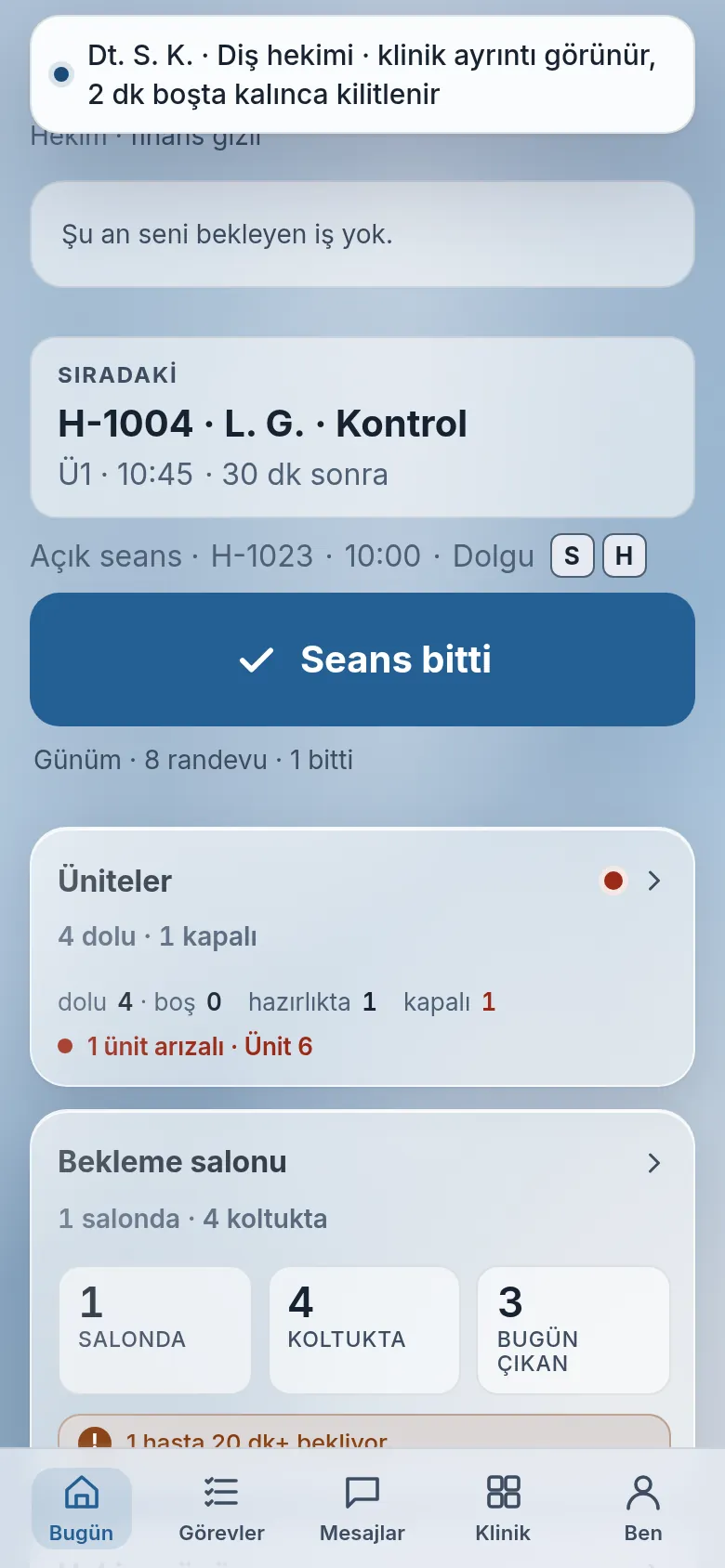
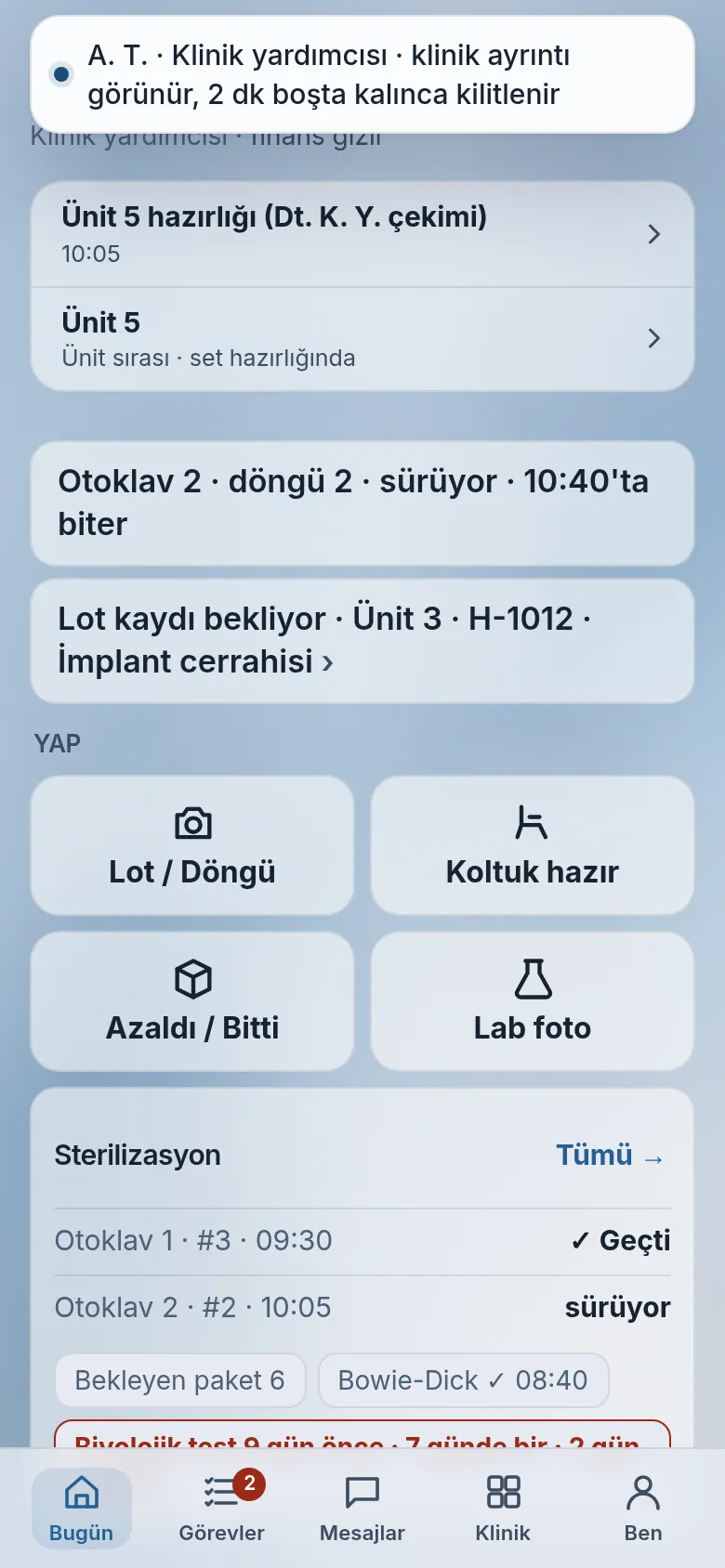
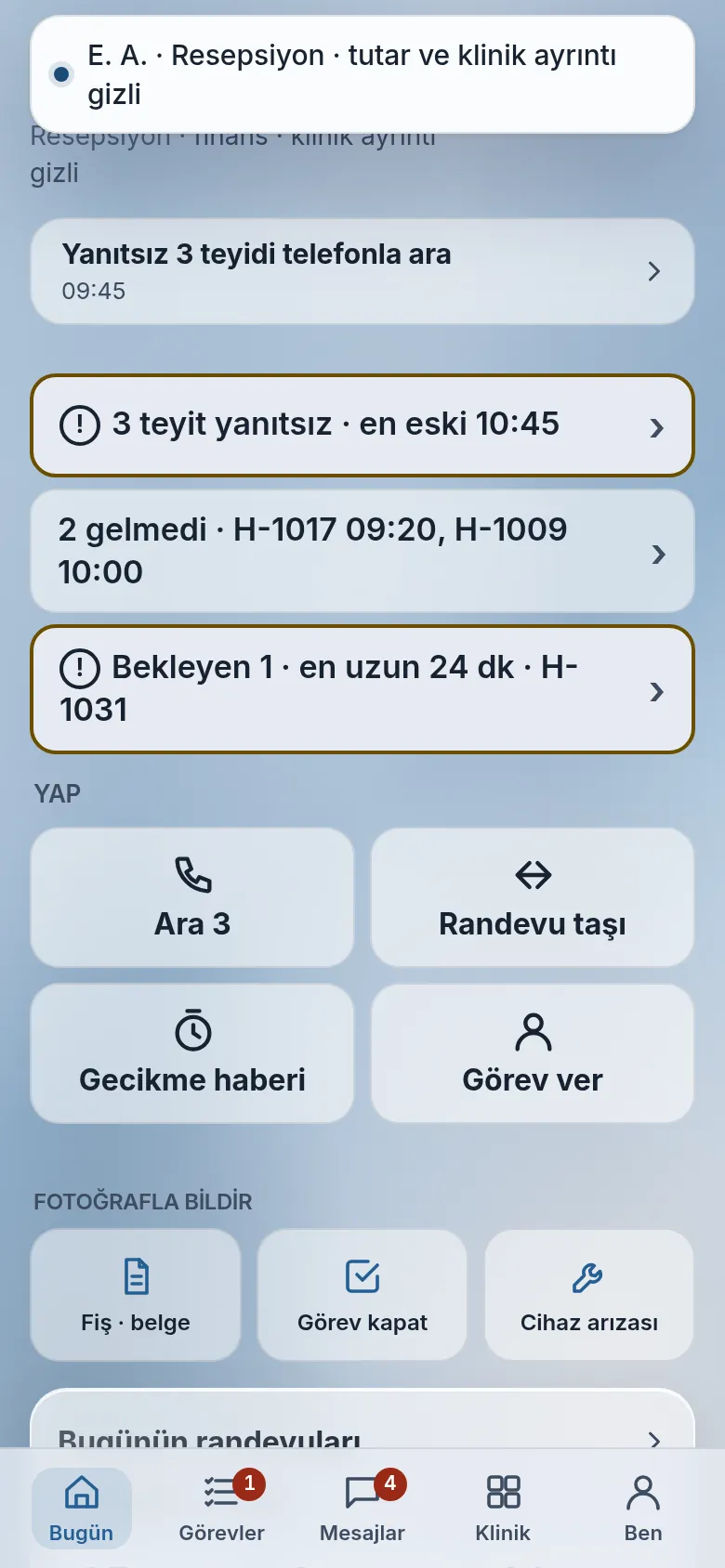
The dentist sees the next patient, the assistant their tasks, reception the confirmations, the clinic owner the approvals. The same app opens by role.

Phone, dentist role: the day’s patient list, the next patient and procedurePhone, clinic assistant role: task list, unit preparation and sterilizationPhone, reception role: tomorrow’s confirmations and patients to callPhone, clinic owner role: pending approvals and the day’s summary
  • Dentist next patient
  • Assistant tasks
  • Reception confirmations
  • Owner approvals
Confirmation box: tomorrow 18 appointments, 13 confirmed, 5 to call; the patients to call in the list

Confirmation: who to call is clear

Tomorrow’s appointments are split into confirmed and to call. A reminder draft is ready for the patient to call; reception approves.

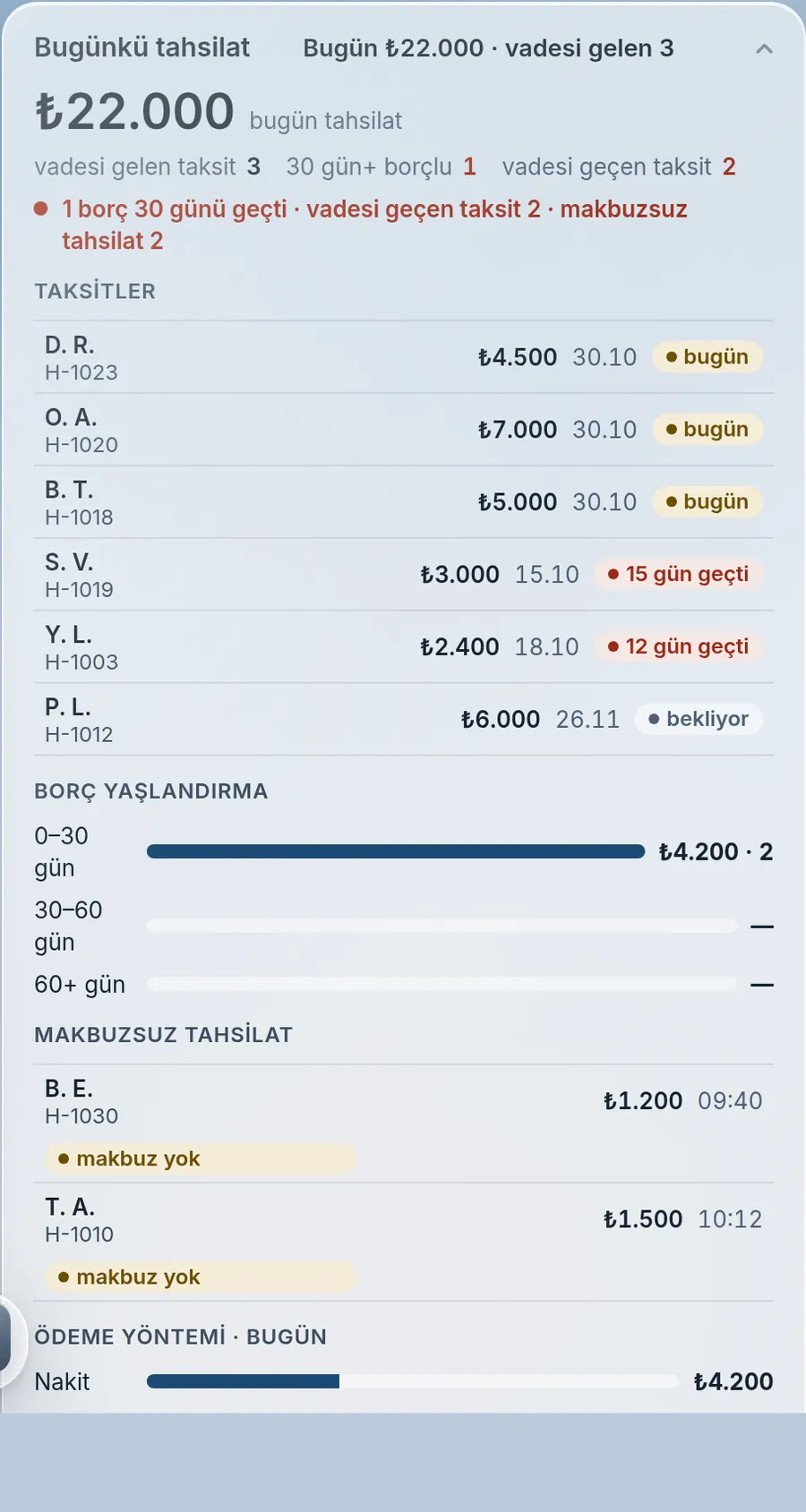
Collection box: ₺22,000 today; 3 installments due, 1 owing over 30 days, 2 without receipt

Collection and installments, at a glance

The day’s collection, installments due, debt over 30 days and procedures without a receipt in the same box. When the reminder day comes, a draft appears.

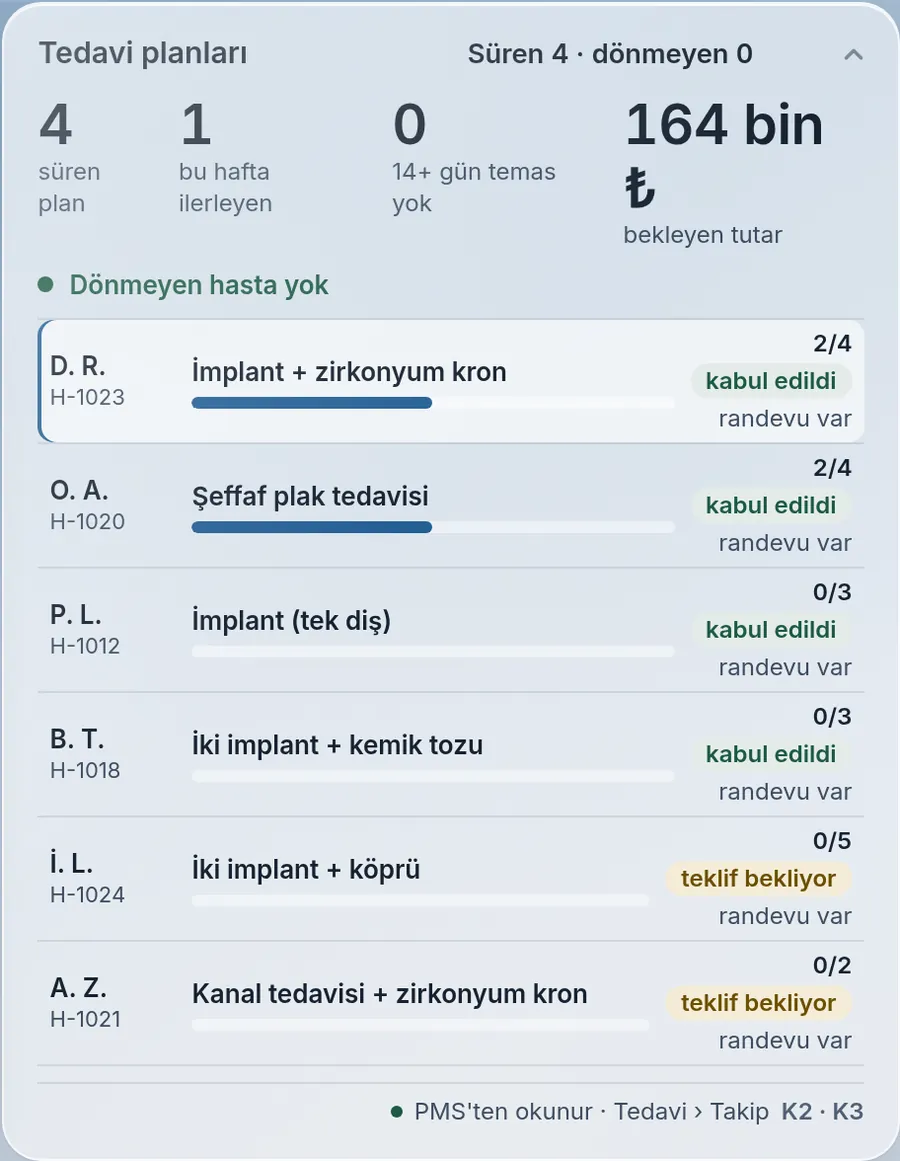
Treatment plan box: plans awaiting approval, number of items and amount

Treatment plan, with approval

The dentist’s plan sits item by item; the coordinator approves, and the patient gets a one-page PDF. An accepted plan turns into the installment calendar.

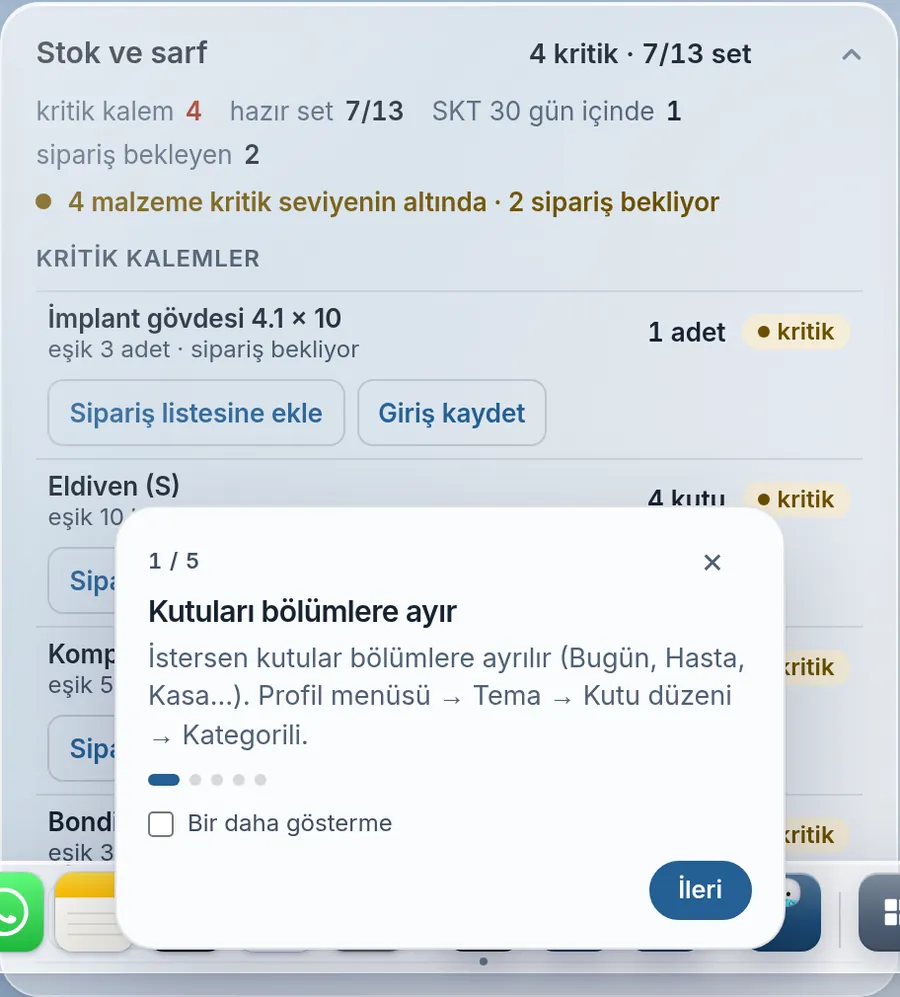
Stock box: 4 critical items, with the quantity left and the last order on each

Critical stock

Gloves, anesthetic, implant components: an item that falls below the critical level lands on the list, and an order task opens.

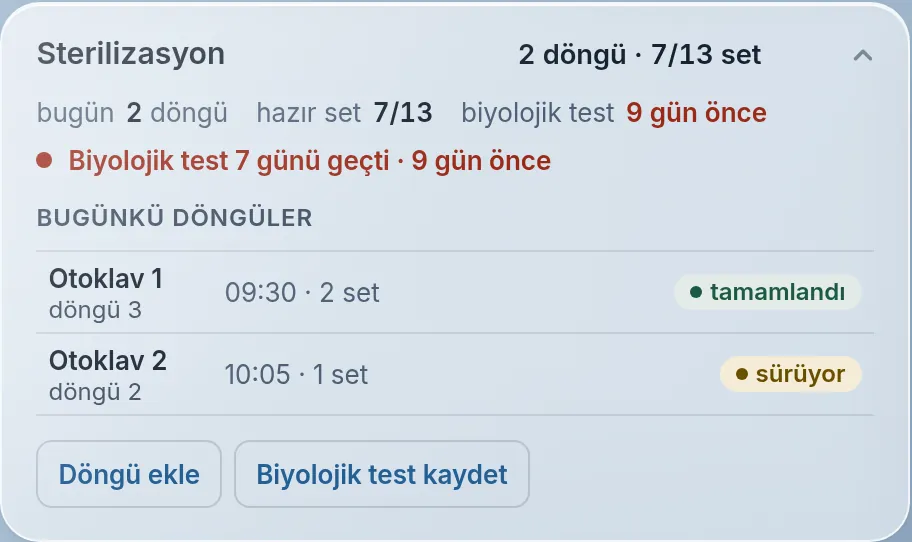
Sterilization box: 2 cycles, 7/13 sets ready, warning that the biological test is over 7 days

Sterilization on the day

Cycle, sets and biological test on the same card. A test past its time gives a red warning, and a task opens by itself.

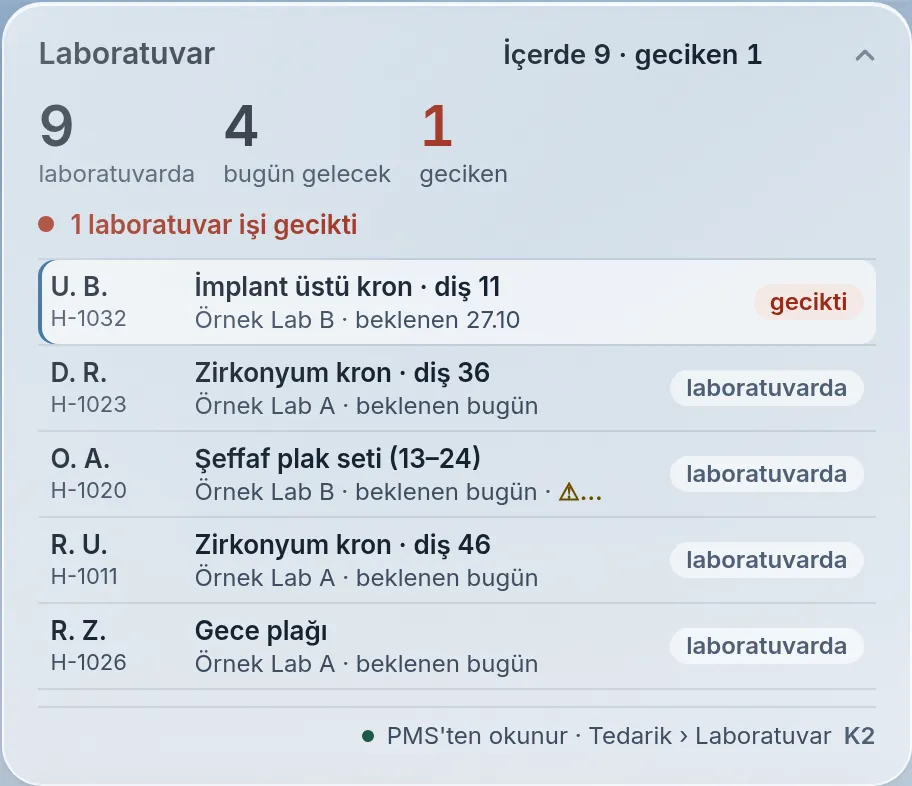
Laboratory box: 9 jobs in, 1 late; the late job in a red row

Laboratory jobs

Which job is at which laboratory, when it was promised, is anything late: know before the try-in appointment arrives.

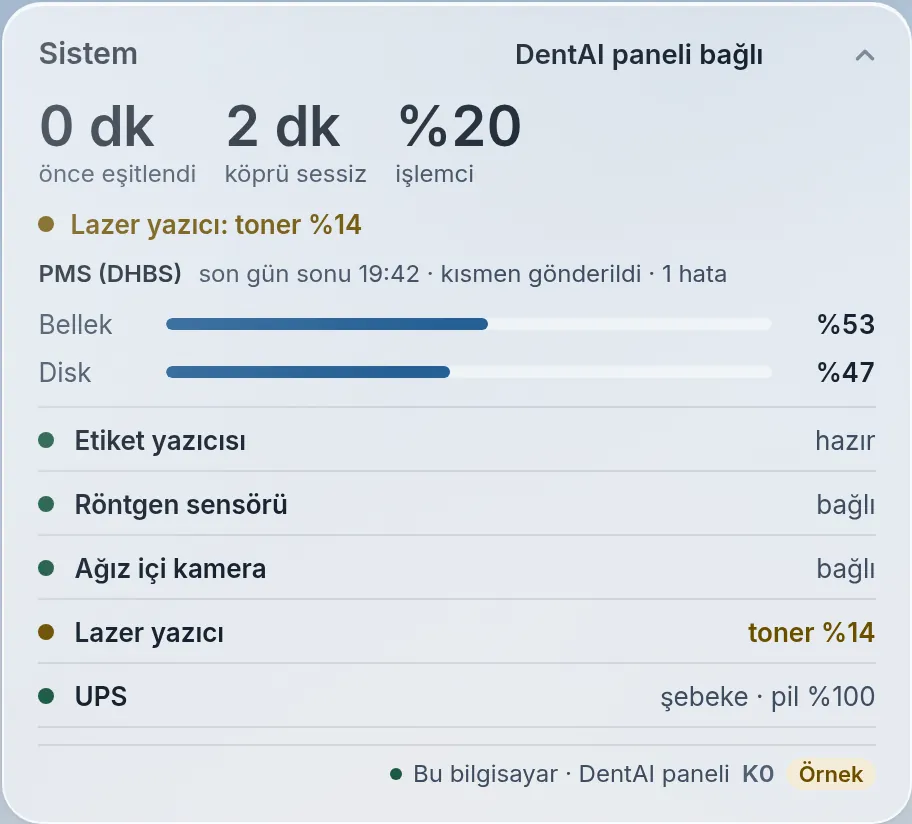
System box: clinic software last end of day 19:42, partly sent, 1 error

End-of-day status

The time of the last send-off, whether it went partly or in full, and the number of errors are written in the system box. If there is an error the row is red, with the correction step beside it.

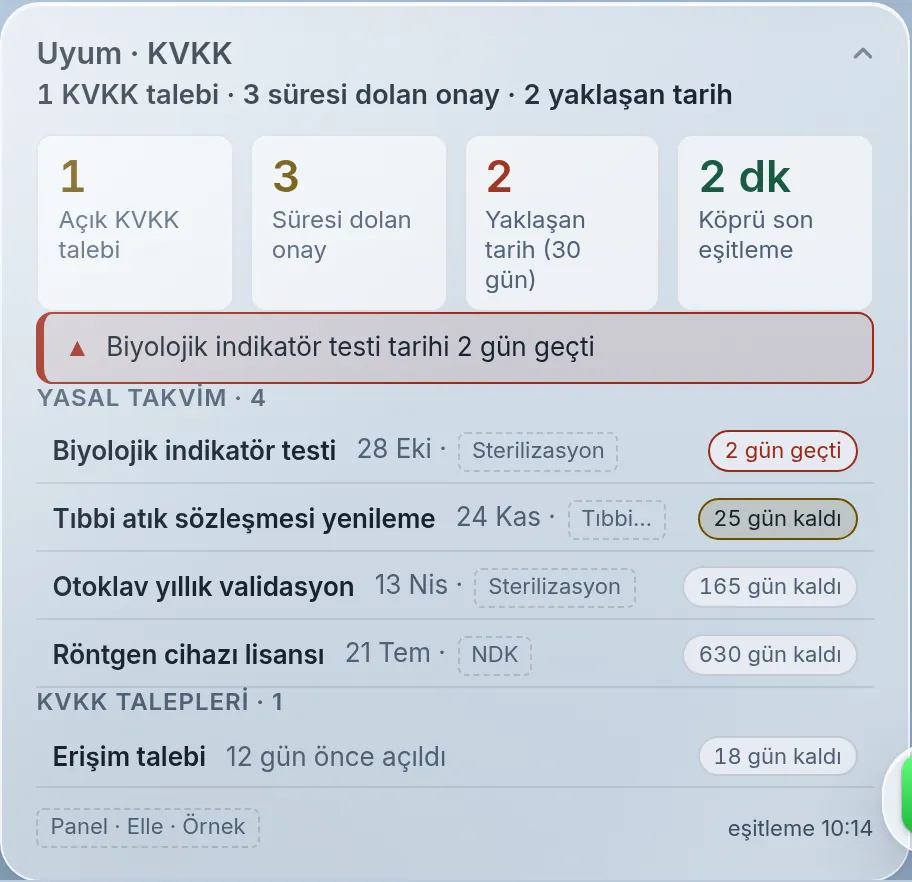
Compliance box: 1 open KVKK request, the time left and who is responsible

Compliance and KVKK requests

A patient’s data request lands in the box as soon as it is opened; the time left and the person responsible beside it. Patient card views leave a trail.

Setup and backup are on us

The server (VPS), domain name, company email and backup are in the setup package. We prepare the environment for your clinic; your clinic software remains the single source of patient, treatment and payment records.

24/7 visibility. 21 days of watching together.

Open messages, tasks, approvals and day handover show on the same screen; even as shifts change, where the work stands is not lost. For the first 21 days it follows the flow with your team, finds the pending steps, and we set things up to your clinic’s routine.

The classic setup.
With DentAI.

The classic setup: clinic software, WhatsApp groups and Excel. DentAI does not drop the clinic software; it completes the missing layer.

Comparison of the classic setup and DentAI
FeatureClassic setupclinic software + WhatsApp groups + ExcelWith DentAIyour clinic software + DentAI
Appointment, patient card, treatment record in the clinic softwareYesYesstays in the program
All patient messages in one listNoYes
AI reply draft, goes out with human approvalNoYes
Tomorrow’s confirmations are separated, reminder draft readyPartlymanual call listYes
Messaging for people and groups made for the clinicPartlyin personal phone groupsYes
Task lands on the person and group, closes with a photoNoYes
Note and task result entered into the clinic softwarePartlyif typed by handYesentered with approval, its trail is visible
Comparing the status in the chair with the software recordNoYes
Installment due dates and debt over 30 days in one boxPartlyon separate report screensYes
Discount and installment approval with revenue impactNoYes
Sterilization and biological test tracking with a taskPartlyin a paper notebookYes
Treatment plan as a one-page PDF, in the patient’s languagePartlyYes
Role gate on the shared screen and a short lockPartlyYes

The classic setup does not describe a specific product, but the way dental clinics commonly work.

A reception day.
Before and after.

How do the steps and waiting time change in seven common jobs? Sample scenario. The values are estimates, not measurements.

Seven common jobs · a sample day

Classic setup~135 min

With DentAI~13 min

In this example the estimated difference is about 122 minutes, roughly 10 times. We measure the times at your own clinic together during the 21-day watch.

Estimated steps, clicks and time, sample scenario
WorkClassic setupWith DentAI
Confirming tomorrow’s appointments~30 min18 calls · list by hand~3 min5 drafts · 1 approval
Replying to a patient message~6 min6 steps · 12 clicks~30 s2 steps · 3 clicks
Treatment plan and price quote~12 min6 steps · 18 clicks~1 min2 steps · 4 clicks
Assigning and tracking a job for the assistant~14 min5 steps · 9 clicks~40 s2 steps · 3 clicks
Discount or installment approval~15 min5 steps · 8 clicks~30 s2 steps · 2 clicks
Finding installments that are due~18 min7 steps · 20 clicks~1 min2 steps · 3 clicks
End-of-day send-off and check~40 min9 steps · 30 clicks~6 min3 steps · 8 clicks
Total (estimated)~135 min56 steps · 115 clicks~13 min18 steps · 24 clicks

Assumption: in the classic setup confirmation calls are made by hand from a list, patient messages in separate apps channel by channel, team chat in personal message groups, and the installment and end-of-day check on program report screens. The times are for doing a job once; we measure the real values at your clinic together during the 21-day watch.

All the features.
In every plan.

Only the AI usage limit separates the plans. All 23 boxes are open in all four plans. Prices are per clinic, monthly, in US dollars.

Starter

$159/mo

The AI usage limit depends on the plan; it is written in the quote

Ask for information

Standard

$279/mo

The AI usage limit depends on the plan; it is written in the quote

Ask for information

Professional

$449/mo

The AI usage limit depends on the plan; it is written in the quote

Ask for information

Enterprise

$659/mo

The AI usage limit depends on the plan; it is written in the quote

Ask for information
Plan comparison, category summary
FeatureStarterStandardProfessionalEnterprise
AI usage limitbasicmediumwidewidest
Patient4 boxes✓✓✓✓
Appointment3 boxes✓✓✓✓
Treatment3 boxes✓✓✓✓
Collection4 boxes✓✓✓✓
In the clinic4 boxes✓✓✓✓
Management3 boxes✓✓✓✓
Show all boxes23 boxes · 6 categories
Plan comparison, all boxes
BoxStarterStandardProfessionalEnterprise
Patient 4 boxes
Patient card✓✓✓✓
Reminder✓✓✓✓
Check-up tracking✓✓✓✓
Reviews✓✓✓✓
Appointment 3 boxes
Appointments✓✓✓✓
Confirmation✓✓✓✓
Waiting room✓✓✓✓
Treatment 3 boxes
Dentist’s day✓✓✓✓
Treatment plan✓✓✓✓
Laboratory✓✓✓✓
Collection 4 boxes
Collection and installments✓✓✓✓
Quotes✓✓✓✓
Cash✓✓✓✓
Insurance✓✓✓✓
In the clinic 4 boxes
Units✓✓✓✓
Sterilization✓✓✓✓
Stock✓✓✓✓
Handovers✓✓✓✓
Management 3 boxes
Day card✓✓✓✓
Compliance and KVKK✓✓✓✓
Staff✓✓✓✓

In five steps
at your clinic.

  1. Let’s meet

    Tell us briefly about your clinic, the software you use and your team’s day. Setup is free for the first 20 pilot clinics; let’s work out suitability together.

    Don’t put it off; reach us directly. Let’s meet by email right away
  2. Let’s build

    We set up the server, domain name, company email and backup; DentAI comes to the clinic computers. The bridge to your clinic software starts read-only.

  3. Let’s watch for 21 days together

    We follow with your team how confirmation, messages, tasks, approvals and the end of day progress; we find the pending steps and set things up to your clinic’s real routine.

  4. Let’s go live together

    After the observation, the whole team moves to full use together.

  5. We’re by your side

    Support and updates continue. There is no minimum contract term.

Let your patient data stay
under your clinic’s control.

DentAI reads patient data where you keep it, and waits for your approval before writing.

You can ask me questions.

Ask what you’re curious about.

Show all questions and answers
Do I need to change my clinic software?

No. DentAI is not a separate clinic software. It reads appointments, patient cards and treatment records from the software you use; it enters the note and the task result into the same software only when you approve. Your program remains the source of the record.

Which clinic software does it work with?

The bridge works by reading the clinic software, and starts read-only. Tell us in the introductory meeting which software you use; we plan the connection together during the 21-day setup period. Until the program is connected, DentAI’s messaging, task, confirmation and sterilization side works on its own.

Do messages go out by themselves?

No. The AI prepares the reply or reminder draft; no message goes to the patient until someone on your team approves it.

Can we correspond with patients from abroad?

Yes. The AI prepares the draft in the language the patient wrote in; the coordinator’s Turkish note is also translated into the patient’s language. The message does not go out until someone on your team has read and approved the draft.

Do we have to give up WhatsApp?

Patients keep writing to you on WhatsApp; these messages fall into a single list in DentAI. Messaging within the team and tasks move to DentAI communication made for your clinic.

Where does patient data sit?

Your clinic’s software remains the single source of patient data; DentAI reads the data from there. The server, domain name, company email and backup in the setup package are our responsibility. Because health data is special-category personal data, we settle the KVKK scope and consent in writing before setup.

What about the end of day and e-Nabız submission?

Your clinic software continues to make the end-of-day submission. Before the submission DentAI reads the day’s procedures and shows any procedure not entered into the program or missing its code; you make the correction in the software, and DentAI checks again.

What is the difference between the plans?

Only the AI usage limit. All boxes are open in all plans. The number for the limit is written in the plan quote; we choose it together in the introductory meeting according to your clinic’s volume.

Setup fee and contract term?

Setup is $499; it is free for the first 20 pilot clinics. There is no minimum contract term.

What can be done from the phone?

The assistant opens their task on the phone and uploads their photo; the job shows on the shared desktop screen at the same moment. The dentist sees the next patient, reception tomorrow’s confirmations, and the clinic owner pending discount and installment approvals on the phone.

Is there sterilization and stock tracking?

Yes. The autoclave cycle, the number of sets ready and the biological test’s due time sit on one card; when the time passes, a task opens. A stock item that falls below the critical level lands on the list.

Our computers are old, can they handle it?

DentAI is designed to run light on clinic computers. Jobs that need a camera are done from the assistant’s phone, and the result lands on the desktop. We check your hardware together before setup.


The first 20 clinics.
Setup is on us.

We are in the pilot stage. Setup is free for the first 20 clinics. Tell us about your clinic, and let’s meet.

Do not write patient information or health data.

This is a demo form. No data was sent. You can send your application by email to info@hellodentai.com.

Log in to the app

If you are a DentAI customer, log in to your clinic from here.

Log in to the desktop app

DentAI runs on your computer as a Windows app. If it is installed, open DentAI from the Start menu; if not, download and install it. Log in with your ID number, username and password.

Ask for the setup link

Log in to the app

On your phone DentAI opens like an app. Log in with your ID number, username and password.

Ask for the login link
Add to home screen
  • iPhone (Safari): Share button → Add to Home Screen.
  • Android (Chrome): ⋮ menu → Add to Home screen.